Today on How to section we are discussing one of the ways of spoofing MAC address in rooted android phones. A Media Access Control (MAC) address is a 12-character unique identifier assigned to a specific piece of hardware such as the network adapter of your Wi-Fi device. In simple words, a MAC address can be used to uniquely identify your Android phone on the Internet or the local network.
Before you spoof the MAC address, you need to record the original/current MAC address of your device which can be done according to the instruction below:
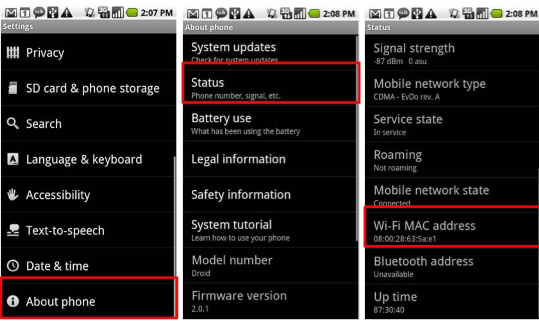
- On the HomeScreen of your phone, tap Menu button and go to Settings.
- Tap About phone and go to Status
- Now scroll down to record the 12-digit code shown under Wi-Fi Mac address. An address would read something like: 08:00:28:63:5a:e1
Requirements for Spoofing the MAC Address
- Rooted Android Phone
- BusyBox app installed on your phone
- Once BusyBox is installed, you need to install Terminal app
Once the above requirements are satisfied, follow the instructions below to spoof your MAC address:
- Open the Terminal app and type the commands as listed below:
$ su [HIT ENTER]
$ busybox iplink show eth0 [HIT ENTER]
(This will show your current MAC address, just for your confirmation)
- Now, type the following command:
$ busybox ifconfig eth0 hw ether XX:XX:XX:XX:XX:XX [HIT ENTER]
(In the above command, replace XX:XX:XX:XX:XX:XX with your new MAC address)
3. You have now spoofed your MAC address successfully. To check for the change, enter the following command again:
$ busybox iplink show eth0 [HIT ENTER]
Now you should see your new MAC address.
Article Last updated: October 18, 2016