Why Trust Gadgetbyte?
At Gadgetbyte, we invest substantial hours into rigorously testing each product or service we review, guaranteeing that you make informed purchases. Learn more about our testing process.
Review Overview
4
Design & Build
8/10
Display
7.5/10
Performance
8.5/10
Back Cameras
8/10
Front Camera
8/10
Software & UI
7.5/10
Battery
8.5/10
Value for Money
8.5/10
iQOO Z3 does a lot of things right for a mid-range phone. It has stellar performance, 5G connectivity, effective thermal solution, reliable cameras, and enduring battery life. While it outshines the competition in these regards, iQOO has compromised on a few areas, like the notched LCD screen, mono speakers, and polycarbonate back.
Vivo’s sub-brand iQOO has come up with a couple of really cool smartphones this year—namely the iQOO 7 and 7 Legend. And while the company’s portfolio extends beyond premium and sub-flagship phones in its home country of China, the iQOO Z3 is its first proper mid-range smartphone in India. Retailing under INR 20K, is it the best phone in its price bracket? Let’s find out in this review of the iQOO Z3.
iQOO Z3 Specifications:
- Body: 75.73 x 164 x 8.5mm, 185.5 gm, IP52 dust-and-splash resistant
- Display: 6.58-inches IPS LCD, 120Hz Refresh Rate, 180Hz touch sampling rate, 460 nits, HDR10, Panda Glass protection
- Resolution: FHD+ (2408 x 1080 pixels), 20:9 aspect ratio, 401 PPI
- Chipset: Qualcomm Snapdragon 768G 5G (7nm Mobile Platform)
- CPU: Octa-core (1x2.8 GHz Kryo 475 Prime & 1x2.4 GHz Kryo 475 Gold & 6x1.8 GHz Kryo 475 Silver)
- GPU: Adreno 620
- Memory: 6/8GB LPDDR4X RAM, 128/256GB UFS 2.2 storage (expandable)
- Software & UI: Android 11 with Vivo's Funtouch OS 11.1 on top
- Rear Camera: Triple-camera; – 64MP, f/1.79 primary sensor, PDAF – 8MP, f/2.2 ultra-wide camera, 120º FOV – 2MP, f/2.4 macro lens (4cm focus)
- Front Camera: 16MP f/2.0 sensor (teardrop notch)
- Audio: Single speakers, 3.5mm headphone jack
- Security: Side-mounted fingerprint sensor, Face unlock
- Sensors: Accelerometer, Ambient Light, Proximity, E-compass, Gyroscope
- Connectivity: Dual-SIM (Nano), WiFi 802.11 a/b/g/n/ac (Dual-band), Bluetooth 5.1, GPS / AGPS / Glonass / Galileo, USB Type-C, NFC, 4G LTE, 5G (n77/n78)
- Battery: 4400mAh with 55W FlashCharge (55W adapter inside the box)
- Color options: Cyber Blue, Ace Black
- Price in Nepal: N/A (Not launched yet)
iQOO Z3 Review:
Design & Build
- 75.73 x 164 x 8.5mm, 185.5 grams
- Glass front, polycarbonate back/frame
- IP52 dust-and-splash resistant
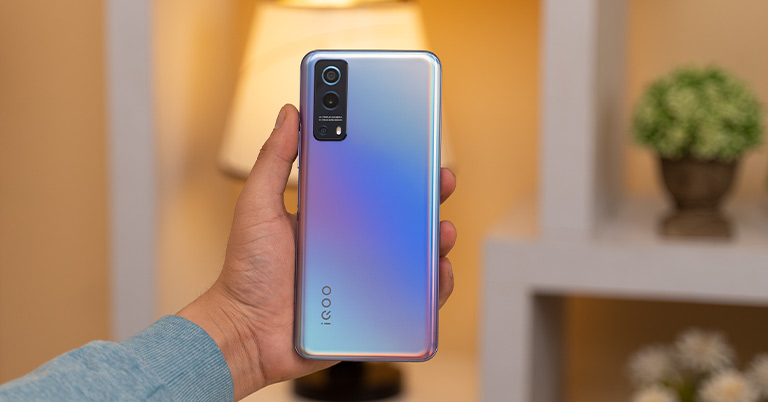
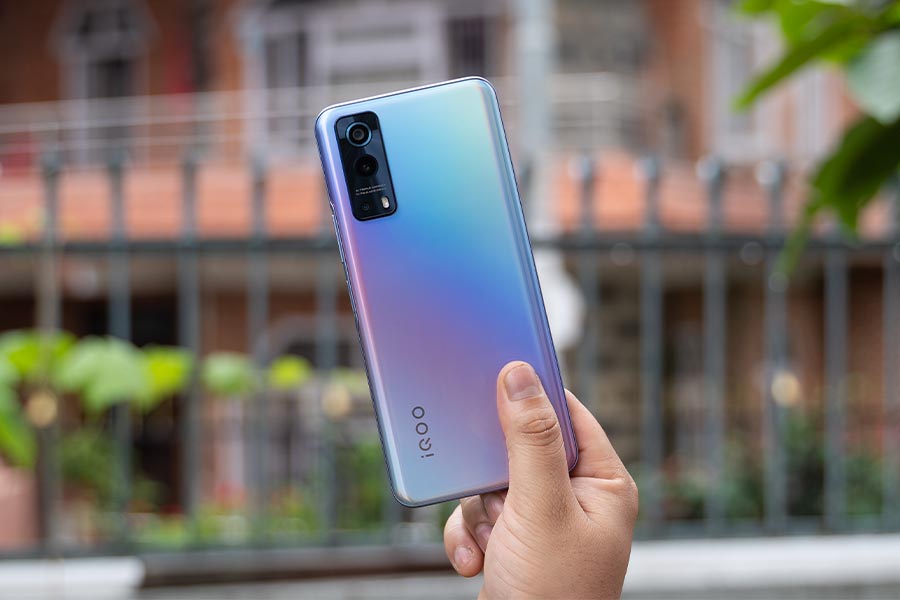
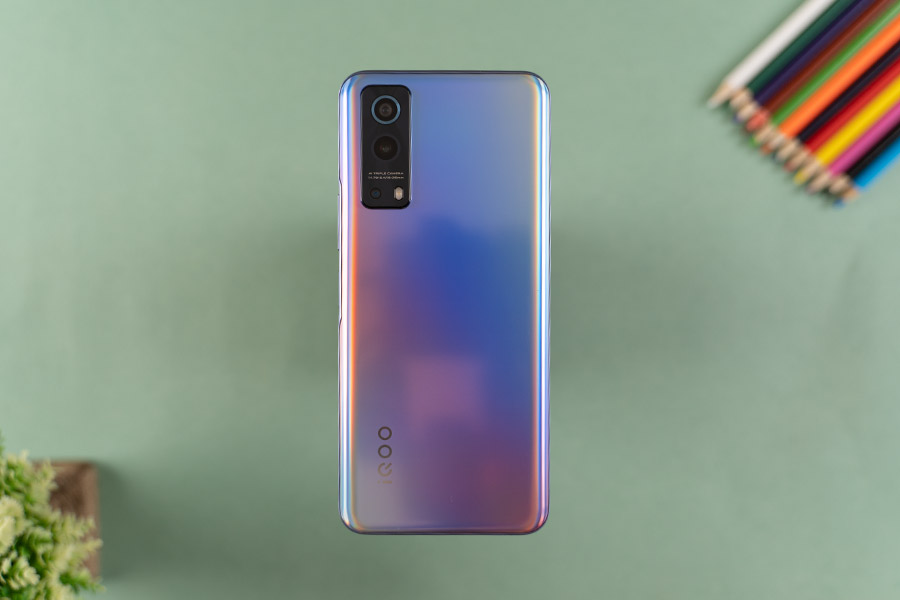
Starting the review with design, the iQOO Z3 is offered in two color options. The “Cyber Blue” variant that I have with me reflects a rainbow-like gradient hue at the back depending on how the light hits the phone’s surface. Looks pretty cool but if something relatively more subtle is up to your wheelhouse, iQOO has got you covered with the “Ace Black” version.
Anyway, what’s common with both color options is the polycarbonate back and frame. As a result, the iQOO Z3 doesn’t feel as premium as other phones in its class like the Redmi Note 10 Pro Max which boasts a glass back.
But if it’s any consolation, this color variant of Z3 does get a matte finish which prevents fingerprints or smudges to a great extent—all the while resulting in a slightly better hands-on feel as well compared to your typical plastic-back phones. I’m quite fond of iQOO Z3’s even weight distribution so holding it in my hand for a while hasn’t been a problem.
Fairly lightweight
Talking about weight, the phone only weighs about 186 grams, further adding to the comfort. The camera module at the back is somewhat inspired by the one on Vivo’s flagship X60 series and it looks pretty good. All the buttons are located on the right frame whereas the left frame stays clean.
Here, the power button also doubles as a fingerprint sensor and its performance leaves no room for complaint. Likewise, you’ll find the SIM tray and a microphone on the top. The SIM slot houses a rubber gasket to prevent water droplets or moisture from getting in, while the phone is also IP52 dust and water-resistant.
Similarly, the bottom frame hosts a 3.5mm audio jack, a Type-C port, another microphone, and a mono speaker setup. All in all, for a plastic-made phone, I’m quite fond of iQOO Z3’s design. It’s nowhere near the “compact” category but it’s not uncomfortably bulky either.
Display
- 6.58-inches FHD+ IPS LCD panel
- 120/180Hz refresh/touch sampling rate
- 460 nits, HDR10, Widevine L1 certified
Compared to other phones in its price range, Z3’s compromise continues on the display side of things too. Instead of an AMOLED panel, iQOO has opted for an LCD screen here. Adding further insult to the injury is the fact that there’s a teardrop notch for the selfie camera instead of a minimalistic punch-hole cutout that we’re used to from sub-20K phones by now.
Not sure how or why the company settled to this design choice since it looks quite dated for a phone that is specially targeted at Gen Z. I would've been a little less critical if it housed a notification LED but that's nowhere to be found either.
Here, the Z3 has a sizable 6.58” IPS LCD panel with a 120Hz refresh rate. In its default color settings, the display produces a-bit oversaturated colors, especially the red and blue hues. Adjusting the color temperature towards the cool range does help things by a lot though. Still, if you like your phone’s screen to pop in terms of colors, it shouldn’t be that big a deal.

Besides this, iQOO Z3’s viewing angles are fine for the most part although I did notice a fall in contrast and saturation levels when looking at it from extreme angles. Additionally, with 460 nits of brightness, this phone gets plenty bright for indoor usage. And while it doesn’t feature DC dimming, it can get dim enough for a comfortable viewing experience under low-light conditions.
Not the brightest tool in the shed
However, things quickly evolve into a struggle when looking at it under direct sunlight. Disregarding the notched screen, even the big bezel on the bottom goes against the phone’s mid-range stature. Still, there’s no visible discoloration or backlight bleeding around the edges of the display which is a good thing.
Moving on, the one saving grace of iQOO Z3’s screen is its well-optimized 120Hz refresh rate. Unlike the POCO X3 Pro that I recently reviewed, there are no micro-stutters or lags when powering through the phone in its optimum capability. On top of being able to manually switch between 60, 90, and 120Hz, turning on “Smart Switch” automatically does it for you.
I tested out its efficacy by using Android 11’s built-in refresh rate overlay and found that the panel is quick enough to toggle between 60 and 120Hz depending on the content. Yet, it seems like Smart Switch can’t lock into the 90Hz mode since, throughout my usage, I graphed the shift between 60 and 120Hz refresh rate only.
Also, the phone defaults to 60Hz mode under dynamic content like YouTube, where scrolling through the comment section while watching a video doesn’t get the high refresh rate treatment. Anyway, with support for a 180Hz sampling rate, I’ve had no complaint in terms of touch response during my gaming sessions either.
Apart from this, iQOO Z3’s FHD display is Widevine L1 certified for HD content streaming as well. Plus, like the company’s more premium offerings, it is HDR10 certified too. While HDR videos played perfectly fine on YouTube, iQOO seems to have left it unoptimized on other streaming platforms like Netflix and Amazon Prime.
Performance
- Octa-core Qualcomm Snapdragon 768G 5G SoC (7nm)
- 6/8GB LPDDR4X RAM, 128/256GB storage (expandable)
- Android 11 with Vivo's Funtouch OS 11.1 on top
Okay, let’s now get into the performance aspect of the iQOO Z3—which is the most coveted feature of this phone. With Qualcomm’s Snapdragon 768G 5G chip onboard complemented by a five-layer liquid cooling system, the company is especially proud of the phone’s gaming performance and effective thermal solution.
While 768G on iQOO Z3 still trails behind POCO X3 Pro’s Snapdragon 860 in terms of sheer power, the aforementioned cooling mechanism somehow makes up for the difference—when it comes to prolonged sessions of resource-demanding gaming.
Gaming experience
Under Genshin Impact, keeping the graphics settings to High, motion blur to Low, and 60 fps gameplay turned on, the phone jumped from 35ºC CPU and 32ºC battery temperature to 44ºC and 40ºC respectively after 10 minutes of gaming. Similarly, after about 21 minutes, the CPU and battery temperature levels read 46ºC and 42ºC, respectively.
Here, iQOO Z3 was able to maintain a stable 60 fps throughout the session with minor stutters on a few occasions—especially when the game had to load a bunch of NPCs or creeps. This thermal performance is fairly impressive although two-thirds of the phone got quite hot here, especially near the camera module. So, for better Genshin Impact gaming, I dialed down the graphics settings to Medium and FPS to 30.
And yeah, Z3’s graphite-powered cooling layer was able to keep up under these settings, with CPU and battery temperature settling at 44ºC and 40ºC after 25 minutes of gaming. Despite the dialed-down visual fidelity, I still noticed a few instances of stutters here.
Likewise, PUBG Mobile maxes out at Smooth graphics and Extreme frame rate on the iQOO Z3 and I found this to be the optimal setting for this game. Even after a little over half hours of continuous gameplay, the CPU and battery temperature settled to just 41ºC and 37ºC, respectively. And of course, the gameplay is exceptionally smooth here with a stable 60 fps maintained all through the session.
But if you opt for a better visual glow-up, the iQOO Z3 can hit HDR graphics and Ultra frame rate too. Here, the gaming experience is perfectly fine although the phone does get slightly hotter here.
Gaming features in Funtouch OS
Also, out of all the games I tested, only PUBG Mobile supports “4D Game Vibration” where you can assign the trigger locations for an immersive experience. Other gaming features on this phone that I like include Esports mode for disturbance-free gameplay and Eagle Eye Enhancement for better enemy visibility.
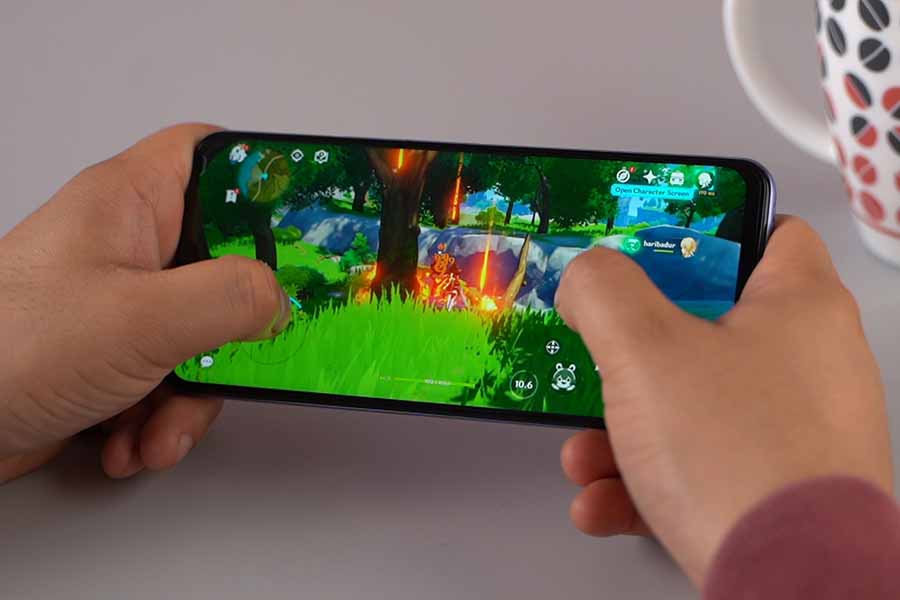
Moving on, comparatively less demanding titles like COD Mobile don’t break a sweat to Snapdragon 768G either. Even in its highest settings (Very High graphics, Very High frame rate), the phone doesn’t heat up at all. Now, because there’s a 120Hz screen on board, I tried playing Critical Ops which has 120 fps mode but the Z3 is capped at 60 fps only.
Finally, I also played a couple of emulator games like PSP’s God of War: Ghost of Sparta and got an average of 48-52 fps under 4x render resolution and 3x upscaling. Besides impressive gaming, iQOO Z3 handles everyday tasks with ease as well. Its Snapdragon 768G onboard has been coupled with 6/8GB of LPDDR4X RAM and 128/256GB of UFS 2.2 internal storage—spread into three memory variants.
The phone also enjoys the “Extended RAM” feature which temporarily configures 3GB of internal storage into virtual RAM instead for better multitasking. Additionally, the phone doesn’t throttle performance under heavy load either.
For this review, I ran a CPU throttle test for 30 and 60 minutes and as you can see from these graphs, iQOO Z3 retains an exceptional level of performance. While I’ve had little issues with multitasking between relatively heavyweight apps, I found Vivo’s Funtouch OS 11.1 to be unnecessarily strict on smaller background processes.
Benchmarks:
| iQOO Z3 | ||
| Androbench | Sequential Read | 998.96 MB/s |
| Sequential Write | 463.49 MB/s | |
| AnTuTu v8.5 | Total | 375542 |
| CPU | 120274 | |
| GPU | 106404 | |
| Memory | 71474 | |
| UX | 77390 | |
| AnTuTu v9.0 | Total | 443160 |
| CPU | 126602 | |
| GPU | 115879 | |
| Memory | 81110 | |
| UX | 119569 | |
| Geekbench 5 | CPU (Single Core) | 708 |
| CPU (Multi-Core) | 2014 | |
| Compute (OpenCL) | 1504 | |
| PCMark (Work 3.0 Performance) | 8361 | |
| 3DMark (Wild Life) | 1949 | |
For instance, I used the "CPU Monitor" app to test the CPU and battery temperature during my gaming sessions for the preparation of the iQOO Z3 review. On multiple occasions, the system killed its process in the background. I tested with sticky notification of other apps like Nepali Patro, NetMonster, AnTuTu, and Game Booster to see if it’s app-specific, but no. Eventually, Funtouch OS killed the background process of all these apps—most of the time even when I had the screen on.
Don't kill background processes, please
I further played around with background process limit settings under Developer Options but that didn’t solve the issue either. How is this happening on a system that boasts “Extended RAM”, I’ll never know. It’s almost like iQOO is making fun of itself here. Throughout the review period, I haven't received any update addressing this issue on the iQOO Z3 either.
Anyway, Funtouch OS is subject to further criticisms as well. While I admire its close-to stock Android design, practically every iQOO-enabled features come with their own privacy-related terms and conditions. This includes everything from the app drawer, lockscreen poster, global search, to the iManager app. It also comes with a bunch of bloatware apps pre-installed.
Thankfully, you can uninstall most of them and the annoying notifications from the unremovable system apps can be disabled as well. You can also switch Vivo’s Jovi Home with Google Feed instead. One thing that still doesn’t work here is Android 11’s navigation gesture for quickly switching between recent apps.
Cameras
- Triple-camera setup at the back
- (64MP main, 8MP ultrawide, 2MP macro)
- 16MP selfie camera (teardrop notch)
On to the cameras, the iQOO Z3 brings a triple camera arrangement at the back led by a 64MP Samsung ISOCELL GW3 sensor. Completing the setup is an 8MP ultrawide sensor with a 120º FOV and a 2MP macro lens. For the purposes of this review, I compared the camera performance of the iQOO Z3 against the Redmi Note 10 Pro Max.
Normal Images
Starting with the normal daytime images, you can see that images from iQOO Z3 look oversaturated with high contrast.
On the other hand, Note 10 Pro Max produces relatively low contrast while its photos do look a little hazy at times. Both phones perform similarly in terms of dynamic range although the ones from Note 10 Pro Max look comparatively sharper.
Wideangle Images
Ultrawide images share a similar story as well.
The excess vibrance in images from iQOO Z3 looks unnatural most of the time although it works in its favor on certain occasions.
I also noticed “chromatic aberration” or “color fringing” in its photos where the camera’s image processing results in colored edges like in this part of the image.
Portrait Images
Edge detection is similar in portrait shots from both phones.
However, the subject’s skin tone looks slightly flat on Note 10 Pro Max whereas iQOO Z3 overexposes them by a bit. There’s also a slight yellowish tint in the latter’s portrait photos.
Macro Images
As expected, macro shots are far superior on the Note 10 Pro Max thanks to its variable focus distance.
Albeit oversaturated, its close-up shots retain far better details, while taking macro photos from iQOO Z3’s fixed focus macro camera is a struggle.
Nighttime Images
Getting to low-light photography, regular nighttime images from Note 10 Pro Max have better exposure and HDR. On the other hand, there’s a noticeable reddish tint in iQOO Z3’s nighttime shots.
Turning on night mode, iQOO Z3 manages to let in far more light detail under extremely low-light situations while the Note 10 Pro Max surprisingly fails in this regard.
But besides this, most night mode shots from iQOO Z3 look oversharpened whereas Note 10 Pro Max maintains superior exposure.
Still, iQOO Z3 lets you shoot ultrawide night mode photos too although it doesn’t improve upon regular ultrawide nighttime images by a lot. The photos do look muddy and with little detail. Coming to the front, selfies from Note 10 Pro Max have excess sharpness, are lacking in contrast, and look unnaturally dark.
Selfie Images
In contrast, iQOO Z3’s 16MP shooter captures selfies with better dynamic range while clinging to oversaturation like in the daytime and wideangle images.
There’s also a slight warm-yellowish tone in its selfie shots.
Likewise, portrait selfies from Note 10 Pro Max are complemented by a pinkish tint, low contrast, and an overall darker hue. Nevertheless, it does have a better edge detection in some cases.
Videography
Moving on, the iQOO Z3 maxes out at 4K/60fps recording although it’s void of any sort of stabilization. However, it does bring EIS when toning it down to 4K/30fps. Compared to Note 10 Pro Max, its 4K/30fps videos are better stabilized alongside the trademark pop in terms of colors.
Similarly, Z3's 1080p/60fps footages are steadier and have better exposure management compared to the Note 10 Pro Max. The latter’s videos look quite dark, oversharpened, and have a noticeable greenish tint. It’s the same with 1080p/30fps shots but they’re neck-and-neck in terms of stabilization.

Finally, selfie videos cap out at 1080p/30fps mode on both phones, and they’re not complemented by EIS either. The ones from iQOO Z3 have a yellowish tint to them whereas footage from Note 10 Pro Max looks a little flat. Audio pickup from their respective microphones is quite similar.
Overall, I found the two cameras to differ mostly in terms of their color optimizations. So, I guess it is up to the individual user to decide which one they prefer. However, iQOO Z3 definitely provides better videography prowess compared to the Note 10 Pro Max.
Battery
- 4400mAh battery with 55W FlashCharge
Now, because iQOO values a slim form factor on its phones—which applies to this phone as well—the company has settled for a relatively small battery. Having said that, all through the review, I managed to get at least 6-7 hours of screen-on time from the 4400mAh battery on iQOO Z3 almost every day.

I’d set the refresh rate to Smart Switch and brightness level to 50-60%, while my usage pattern consisted of a couple of hours of gaming, web browsing, streaming music, and watching videos on YouTube.
This may partly be due to the aforementioned aggressive RAM management on lightweight background processes as well. I can’t complain about iQOO Z3’s overnight battery drain either since the max drop I recorded in a day was only 3%.
Juicing it up is equally impressive too. With the 55W adapter provided inside the box, the phone goes from 0 to 50% in 21 minutes, 80% in 36 minutes, and 100% in 54 minutes. When charging the phone, the front panel does get a little warm sometimes although it’s nothing alarming.
Audio
- Mono speaker, 3.5mm audio jack
What’s left in this review of the iQOO Z3? Yes, audio. Like I mentioned earlier, iQOO has skimped on a stereo speaker setup here for a rather underwhelming mono speaker. It gets fairly loud enough but the audio sounds muddy while the mids come off a bit overpowering as well.
Of course, bass reproduction is almost non-existent here. Additionally, the haptic feedback here is pretty average only. Apart from this, the call quality on the iQOO Z3 is solid and the max volume doesn’t get too loud so that nearby people hear it as well.
Conclusion
Wrapping up this review, the iQOO Z3 an interesting phone, to say the least. With its powerful performance, effective thermal solution, 5G support, and decent cameras, the phone manages to stand out against the likes of POCO X3 Pro and Redmi Note 10 Pro Max.
Yet, iQOO’s unnerving decision to settle for an LCD panel, teardrop notch, and a mono speaker might be a deal-breaker to many. Having said that, if you’re looking for a dependable overall smartphone under INR 20K, the iQOO Z3 is an excellent contender.
- Watch our video review of the iQOO Z3.

iQOO Z3 Review: Pros & Cons
Pros:- Ergonomic, lightweight design
- IP52 dust-and-splash resistant
- Optimized 120Hz refresh rate
- 5G-ready Snapdragon 768G SoC
- Excellent gaming performance
- Impressive camera capability
- Great battery life, 55W charging
- Polycarbonate back and frames
- LCD screen with a teardrop notch
- Funtouch OS needs finetuning
- System kills background processes
- Lacks a stereo speaker setup
Article Last updated: July 2, 2021