
Why Trust Gadgetbyte?
At Gadgetbyte, we invest substantial hours into rigorously testing each product or service we review, guaranteeing that you make informed purchases. Learn more about our testing process.
Review Overview
4
The Asus ROG Strix G16 (2025) gets a lot of things right. Especially with its performance and design. And although it's not the best bang for your buck, it's certainly a compelling gaming/creator laptop for the price.
Design and build
9/10
Display
9/10
Keyboard
9/10
Trackpad
7/10
Performance
9/10
Audio
8/10
Webcam
7/10
Battery
6/10
Value for money
8/10
Asus ROG Strix G16 (2025) review: Specifications
- Dimensions, Weight: 13.94 x 10.55 x 0.90 – 1.21 inches (W x D x H), 2.65 kg
- Display: 16-inch "ROG Nebula" IPS panel, WQXGA resolution, 240Hz refresh rate, 100% DCI-P3 color gamut, 500 nits brightness
- Keyboard: Full-size per-key RGB backlit keyboard
- Security: Windows Hello face login
- CPU: Intel Core Ultra 9 275HX (TSMC N3B)
- 24 cores, 24 threads, up to 5.4 GHz boost clock
- GPU: NVIDIA GeForce RTX 5070 Ti (140W TGP, 12GB GDDR7 VRAM)
- RAM: 16GB DDR5-5600 (up to 64GB, 2x DDR5 SO-DIMM slots)
- Storage: 1TB M.2 NVMe PCIe 4 SSD (2x M.2 slots)
- Audio: Downfiring 4-speaker system (2 tweeters + 2 woofers)
- Battery: 90Wh Li-Ion battery with 280W charging
- Webcam: FHD (1080p) IR camera, no physical privacy shutter
- I/O Ports: 2x USB-C (Thunderbolt 5), 3x USB 3.2 Gen 2 Type-A, 1x HDMI 2.1, 1x 2.5G LAN, 1x 3.5mm headphone jack
- Price in Nepal: NPR 416,900 (16GB RAM, 1TB SSD)
- Check the full specifications of Asus ROG Strix G16 (2025) here
Asus ROG Strix G16 (2025) review:
Design and build
- 13.94 x 10.55 x 0.90 – 1.21 inches (W x D x H)
- 2.65 kg, aluminum lid, plastic keyboard deck
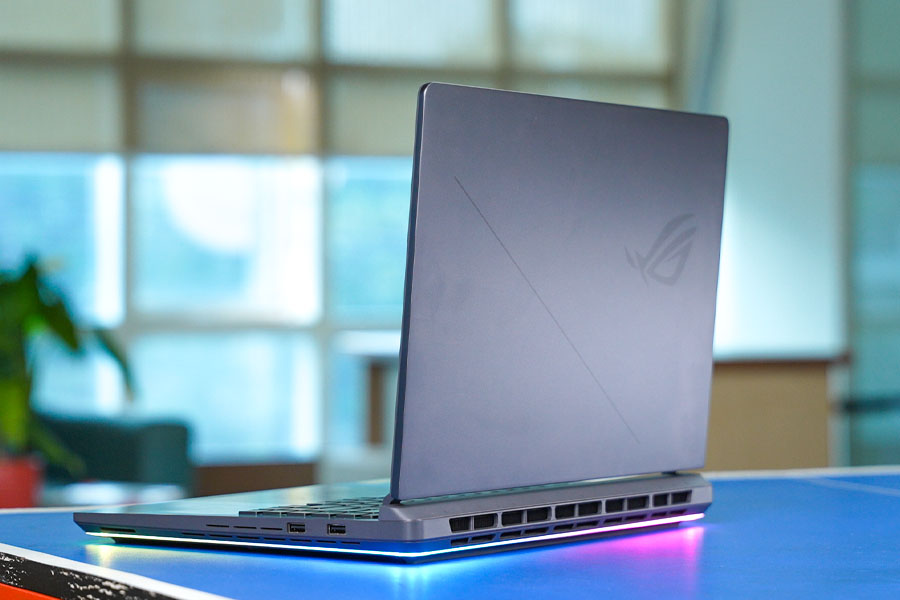
So like I said… it’s the usual stuff. But flip this thing over and that’s where the real magic is.‘Cause Asus has completely redesigned the Strix G16 this year to make it the most upgrade-friendly laptop I’ve laid my hands on yet. Easily. I don’t need to worry about different types of tiny screw heads or misplacing them since all I gotta do is slide the tab to the left and lift it open. That is literally all I need to do to access the RAM, the SSD, and even the three fans of this laptop.

Thunderbolt 5, baby!
What makes the Strix G16’s design even cooler for me is that this is also the very first laptop I’ve used with a couple of next-gen Thunderbolt 5 ports alongside everything else! Yeah, not Thunderbolt 4 but Thunderbolt 5.| Thunderbolt 5 | Thunderbolt 4 | |
| Interface | USB Type-C | USB Type-C |
| Max bandwidth | 80 Gbps (bi-directional) | 40 Gbps (bi-directional) |
| 120 Gbps (asymmetric) | ||
| External display support | 3x 4K monitors @ 144 Hz | 2x 4K monitors @ 60 Hz |
| or multiple 8K monitors | or 1x 8K monitor @ 30 Hz | |
| Power delivery | Up to 240W | Up to 100W |
No gallery images available
The only thing I wish Asus had done differently is put some of these ports — like the one for power and the two-and-a-half gigs ethernet connection — at the back for a cleaner cable management. But I guess since this Strix G16 no longer has exhaust vents on the sides like last year’s model, the back of the laptop had to be all about letting the warm air out.
Display
- 16-inch "ROG Nebula" WQXGA (2560 x 1600) IPS panel
- 100% DCI-P3 colors, 500 nits brightness
- 240Hz refresh rate, G-SYNC, Advanced Optimus

I mean, what else do I need to say about it?You’re looking at a giant 16” IPS panel with a 2.5K resolution, a buttery 240Hz refresh rate, 100% DCI-P3 colors, and 500 nits of maximum brightness. Although my unit of the Strix G16 actually peaked at 555 nits at 100% brightness, so that’s all the more impressive!
No gallery images available
I also love this nice matte coating to get rid of light reflections around me, which could’ve been rather distracting. So doesn’t matter if I’m gaming, doing some color-sensitive work like photo and video editing, or just handling some casual business, the Strix G16’s display is totally a “one-size-fits-all” thing.
But I must tell you that I had to do quite a bit of “diagnosing” to get it working just right.
It's never Lupus.
So the thing is, auto-brightness is something I always disable on any laptop I use. But instead of the “Intel Graphics Command Center” app where this setting usually hides, it turns out Asus has overridden that with its own setting inside the “Armoury Crate” app. What’s worse is that my unit of the Strix G16 simply wasn’t as vibrant by default. The colors looked visibly washed out, and when I measured it, I was right! This guy was only carrying 75% of the DCI-P3 gamut versus 100% as Asus promised.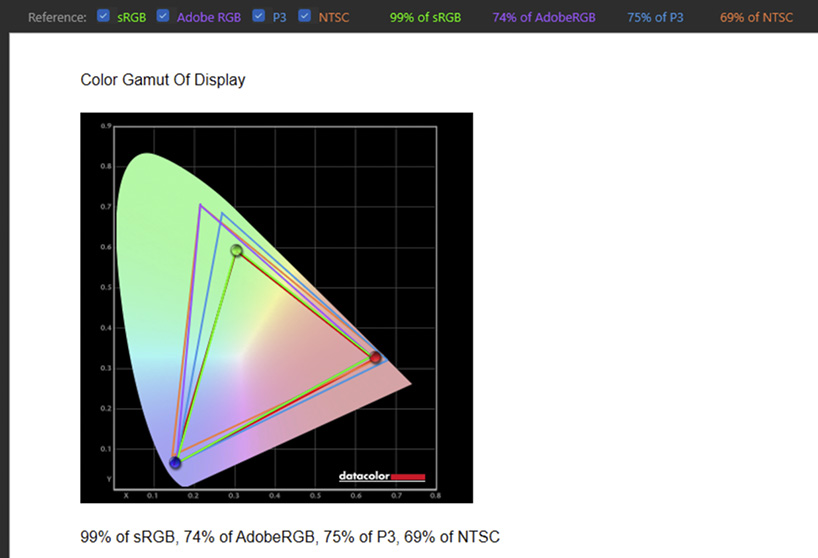
Keyboard
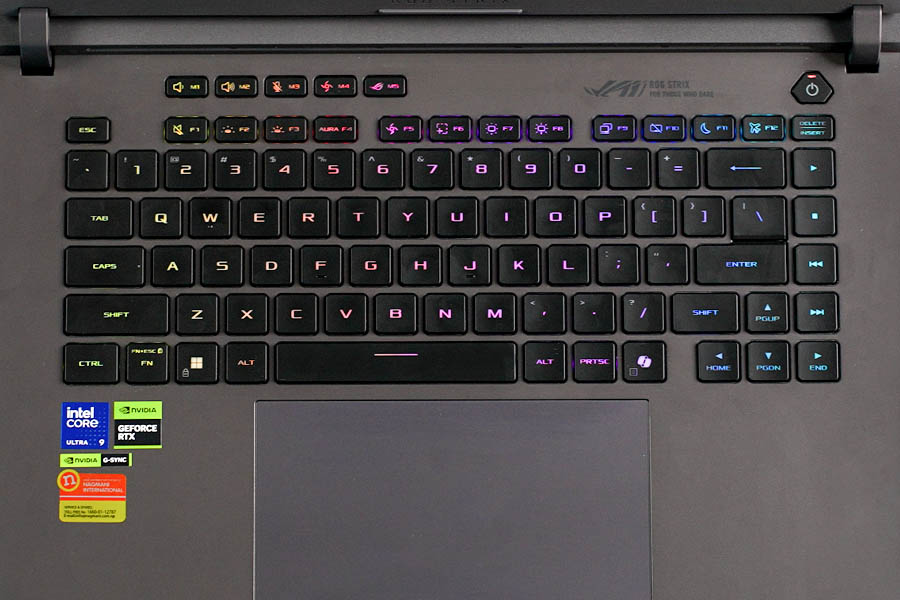
- Full-size chiclet keyboard, no Numpad
- Per-key RGB backlight
Performance
- Intel Core Ultra 9 275HX CPU (24 cores/threads)
- NVIDIA RTX 5070 Ti graphics (140W TGP)
- 32GB DDR5 RAM, 1TB PCIe 4.0 SSD (both upgradeable)
Upgrades, upgrades, everywhere.
And compared to last year’s Core i9-14900HX, it has a healthy 20% upgrade in terms of multi-core performance.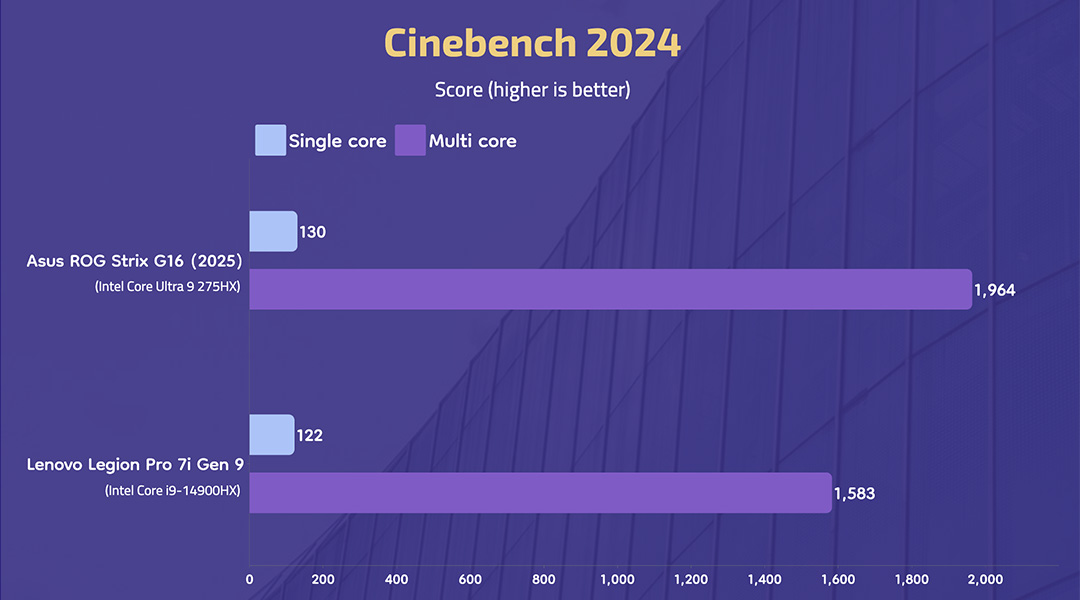
Which is totally not a problem for the 5070 Ti, by the way.The Strix G16’s RTX 5070 Ti has a total 140W TGP (including 25W from Dynamic Boost) — and in all the benchmarks I ran or the games I tested — it had no problem sipping 140W of power when needed.
No gallery images available
And unlike the lower-tier RTX 50 series GPUs with just 8 gigs of VRAM, the 5070 Ti also has 12GB of VRAM… so you can really game at higher resolution with smooth fps and good visual fidelity.
And when I played a bunch of games at native 1600p resolution at the highest settings I could find, almost all of them ran without any sort of “out of video memory” error. I was originally planning on testing them at 1440p as well, but since most modern laptops have a taller 16:10 display, I thought this should be standard from now on.
One more thing.
I also disabled the MUX switch on this thing since I was getting frequent stutters in some of the games. While I even had some creative apps like Premiere Pro crash on me when disabling the integrated graphics using the MUX switch. Alright. So the first game I played was Cyberpunk 2077. And with both graphics and ray tracing set to “Ultra”, I was getting 32 fps on average with a 1% low of 22 fps. Not bad for a “70” series GPU, but you probably already know that the RTX 50 series has a special trick called “DLSS 4” to make the gameplay feel a whole lot smoother and responsive.
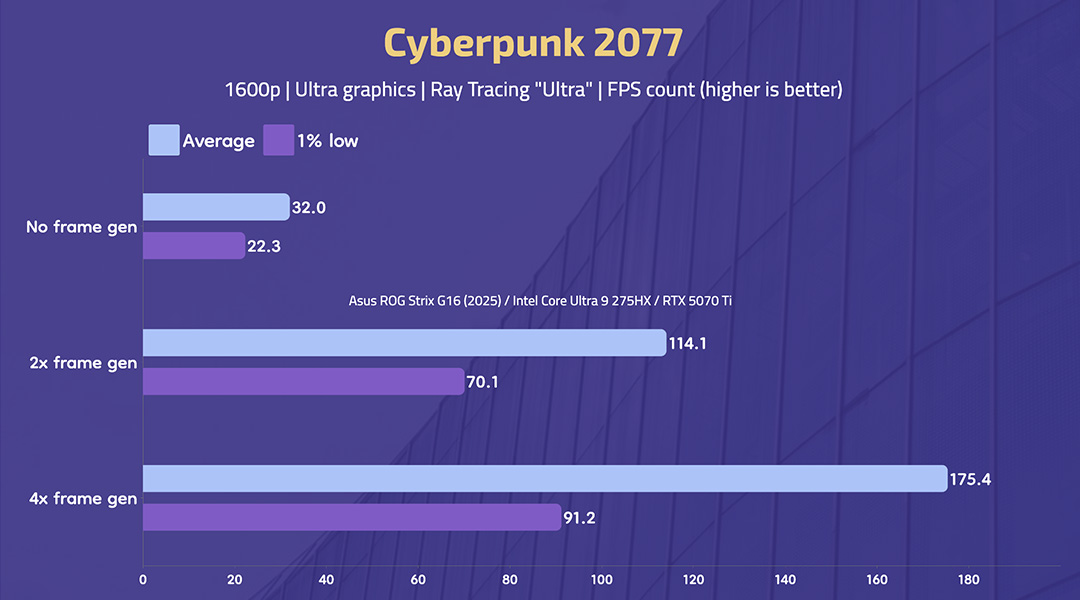
But what about input delay?
Next up, I played Marvel Rivals. This one also supports multi frame generation, which means I went from just 60 fps average to an impressive 220 fps with a simple click of a button.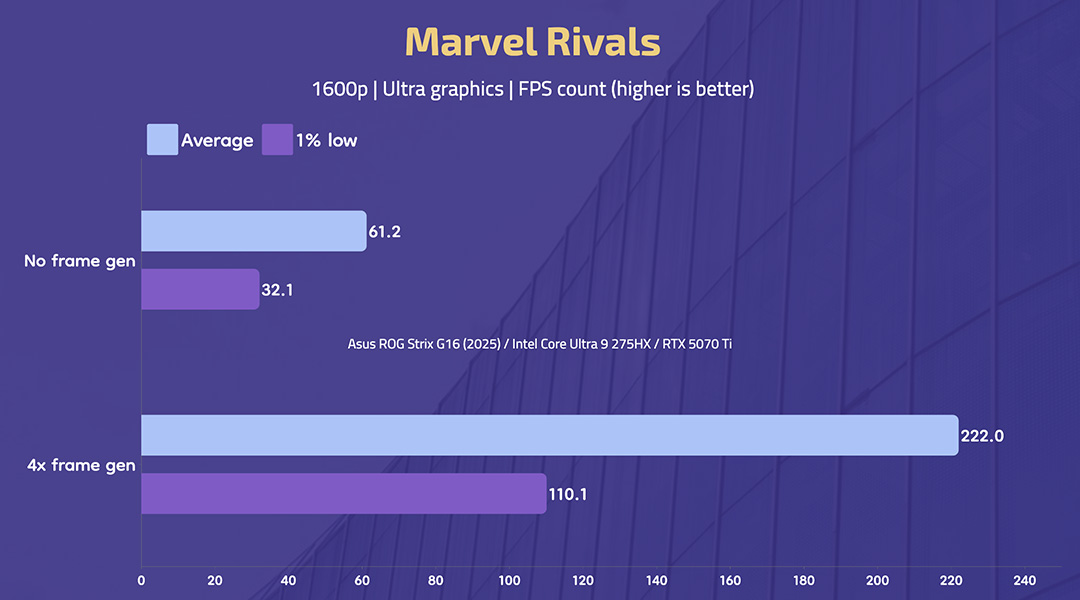
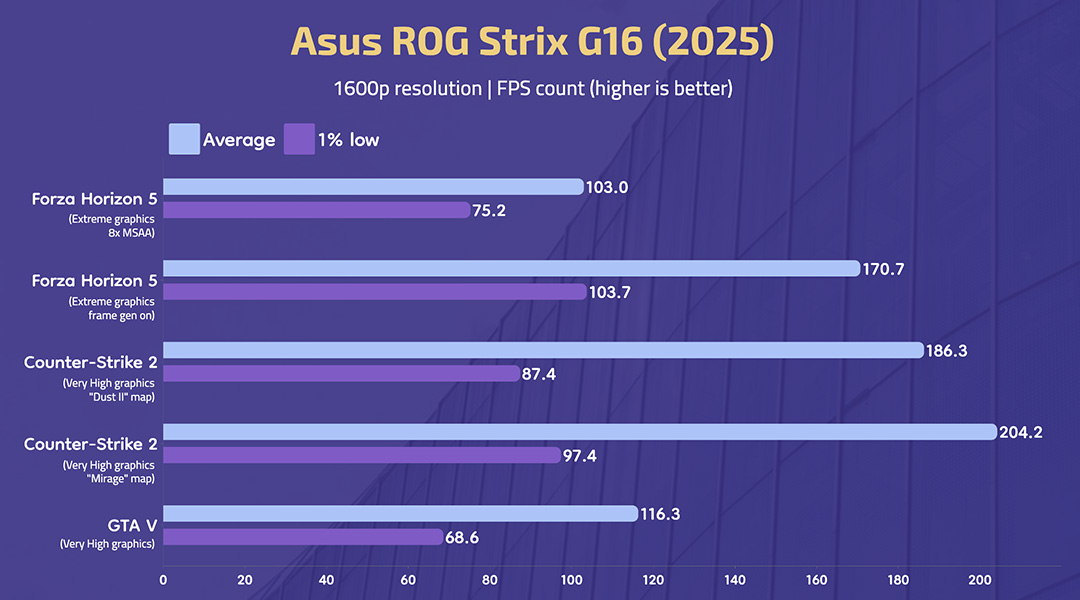
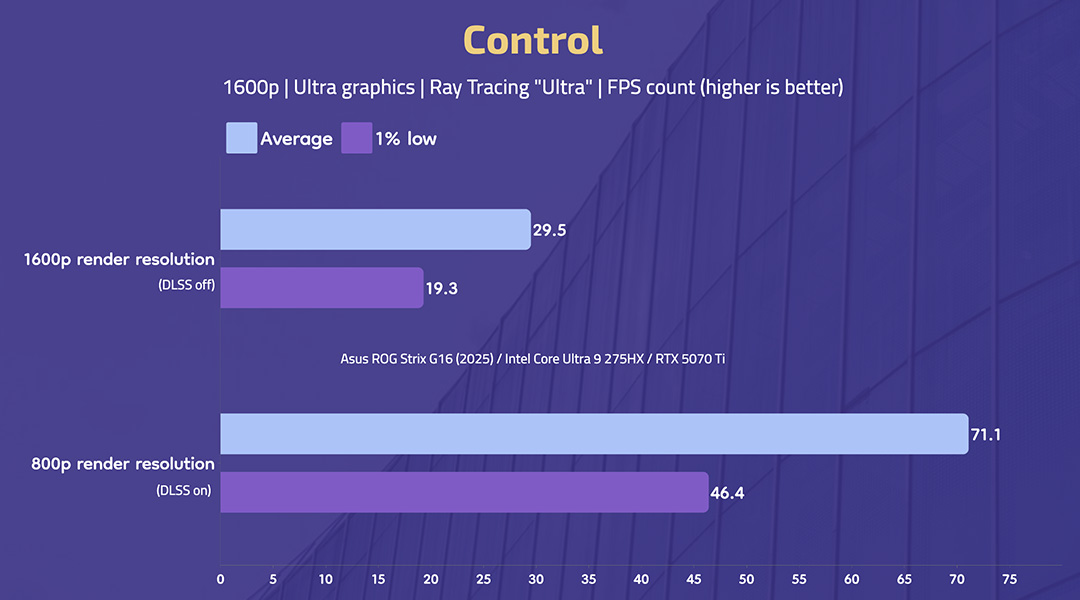
So cool!
Besides excellent gaming results, I’m equally impressed by the Strix G16’s thermals. Because no matter what game it was, the keyboard deck itself felt perfectly cool to touch. Never hitting beyond 36 – 37ºC near the “WASD” and the arrow key area. And even at its max fan speed (under "Turbo" profile), the Strix G16 only ever got as loud as 47 dB. I have seen gaming laptops with far louder fan noise (at 50+ decibels) with far worse thermals, so… this is just spectacular!No gallery images available
I was also taking a close look at the CPU and GPU temperatures when I was gaming — and although that Intel chip would easily climb to 90ºC and beyond — the GPU remained significantly cooler at around 70ºC only.
This was a trend I noticed when using creative apps as well. There was definitely no performance throttling — and everything from working with 4K video projects with multiple layers on Premiere Pro to working with 3D animation on Blender went as smoothly as I expected them to — but that’s something you need to know about anyway.
What's not so great about the Strix G16?
Okay. So far… I’ve talked about the Strix G16’s design that I love, its display that I love, its keyboards that I love, and its performance that I love even more. And as you might have already guessed, I’m not that fond of the rest of the stuff.Trackpad
- Glass trackpad with Windows Precision drivers
Webcam and speakers
- FHD (1080p) IR camera (no physical privacy shutter)
- 4-speaker system (2 tweeters + 2 woofers)

Battery
- 90Wh battery, 280W AC adapter
Asus ROG Strix G16 (2025) review: Conclusion
Alright… I guess I'd better wrap it up now. So, despite all its minor flaws, I think Asus has absolutely nailed it with ROG Strix G16 (2025). The flashy redesign paired with fiercely powerful new chips means there are just so many things to love about this guy. And if you’re looking for a powerful gaming/content creation laptop that will age gracefully over the years, the Strix G16 definitely looks like one of your top choices at around NPR 4 lakhs.
- Watch our video review of the Asus ROG Strix G16 (2025)
Asus ROG Strix G16 (2025) review: Pros and cons
| Pros | Cons |
| • Powerful performance with Intel Core Ultra 9 + RTX 5070 Ti | • The pricing could’ve been more aggressive |
| • Excellent thermals | • No OLED display |
| • Upgrade-friendly design | • A terrible 1080p webcam |
| • 100% DCI-P3 display |
Article Last updated: December 9, 2025